
Overview
This is the v3 beta documentation. The default stable documentation remains 2.x until v3 is released as stable.
Have you ever struggled with implementing complex gesture handling and animations when building image galleries or content viewers in React Native?
Existing libraries often have limited customization options or performance issues. react-native-gesture-image-viewer is a high-performance universal gesture viewer library built on React Native Reanimated and Gesture Handler, providing complete customization and intuitive gesture support for not only images but also videos, custom components, and any other content.
How v3 Paging Works
Version 3 no longer depends on a consumer-provided ScrollView, FlatList, or FlashList for paging. GestureViewer owns horizontal paging internally with a gesture-driven render window.
windowSize controls the size of the render window kept around the current item and defaults to 3. With the default setting, the viewer mounts the previous, current, and next pages. In non-loop mode, pages outside the data range are omitted at the boundaries.
During an animated page change, Reanimated moves the existing pages first. After the transition finishes, the viewer updates the render window around the new current item. Pages that remain inside the window stay mounted, the page leaving the window unmounts, and the newly adjacent page mounts.
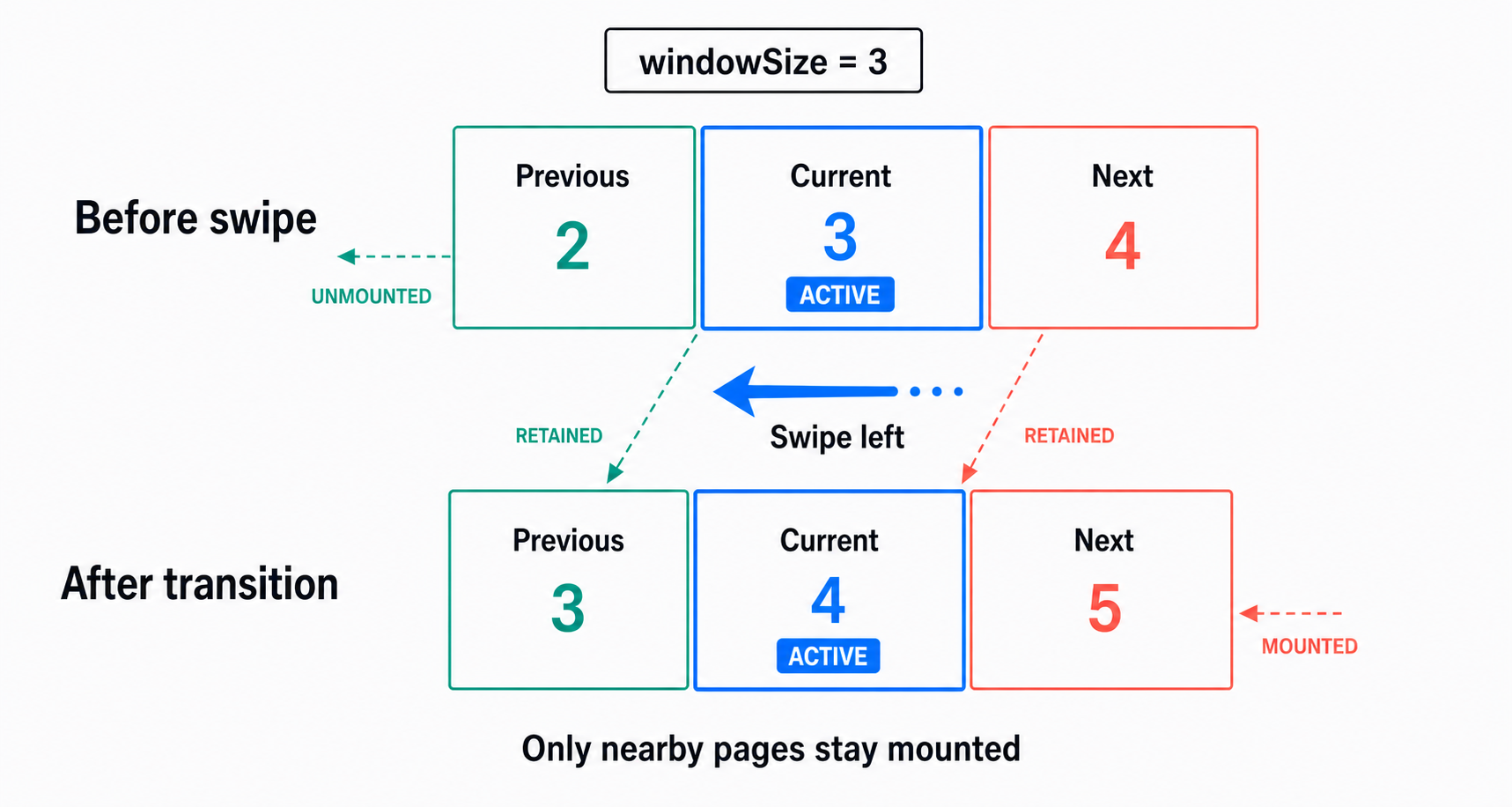
When enableLoop is enabled, the internal render window wraps from the last item to the first and from the first item to the last. This behavior also does not rely on a list implementation.
Use windowSize only when you need more adjacent content mounted, and use pageSpacing when you need visible space between pages.
Key Features
- 🤌 Complete Gesture Support - Pinch zoom, double-tap zoom, swipe navigation, pan when zoomed-in, and vertical drag to dismiss
- 🏎️ High-Performance Animations - Smooth and responsive animations at 60fps and beyond, powered by React Native Reanimated
- 🪟 List-Free Render Window - Internal gesture-owned paging without requiring
ScrollView,FlatList, orFlashList - 🎨 Full Customization - Total control over components, styles, and gesture behavior
- 🎛️ External Control API - Trigger actions programmatically from buttons or other UI components
- 🧩 Multi-Instance Management - Manage multiple viewers independently using unique IDs
- 🧬 Flexible Integration - Use with Modal, React Native Modal, Expo Image, FastImage, and custom content
- 🧠 Full TypeScript Support - Great developer experience with type inference and safety
- 🌐 Cross-Platform Support - Runs on iOS, Android, and Web with Expo Go and New Architecture compatibility
- 🪄 Easy-to-Use API - Simple and intuitive API that requires minimal setup